Genuine output metering
See the live post-fader output level of the selected Windows audio device through a clear digital VU meter.
WM AUDIO TIMER / WINDOWS

Professional monitoring, control and automatic scheduling for Windows audio outputs. See genuine live levels, take immediate control and automate critical mute or unmute actions with precision.
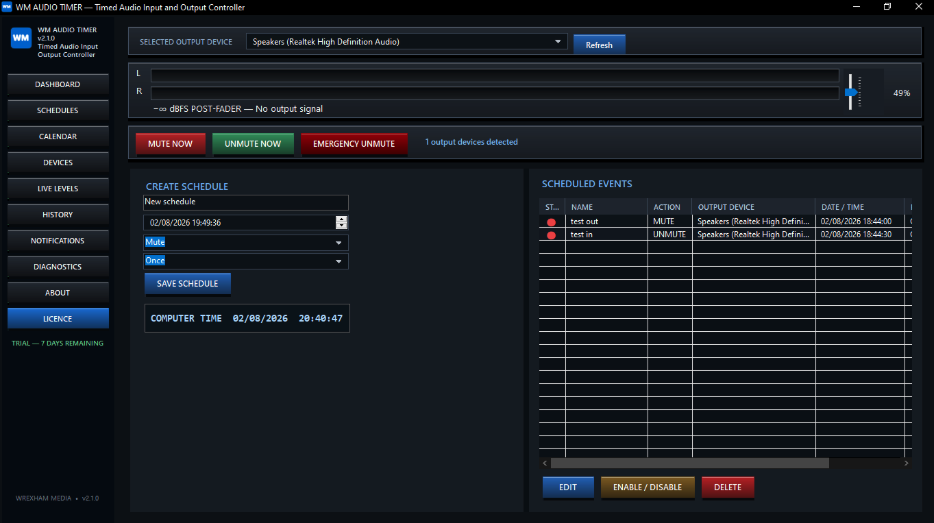
PURPOSE-BUILT CONTROL
WM Audio Timer controls the selected Windows output device directly. It does not play or monitor the audio itself, leaving your existing broadcast, studio or venue workflow uninterrupted.
Choose an output, view its real post-fader level, adjust volume and schedule precise actions. When the main window closes, WM Audio Timer continues running from the system tray so enabled events remain ready in the background.
01 / PROFESSIONAL FEATURES
See the live post-fader output level of the selected Windows audio device through a clear digital VU meter.
Manage output level with the integrated fader, mute immediately or use emergency unmute when speed matters.
Set automatic mute or unmute events for an exact date and time, with one-off or recurring operation.
Repeat actions daily, weekly, monthly, on weekdays or at weekends to suit real operational routines.
Review scheduled events clearly, then edit, enable, disable or delete them with visible status indicators.
Keep schedules operating from the Windows system tray after the main application window has closed.
Use your own SMTP provider to receive completion notifications, with email credentials stored encrypted.
Schedules and settings are preserved during upgrades, supported by an integrated licence-management interface.
02 / BUILT FOR PROFESSIONAL ENVIRONMENTS
03 / LICENCE OPTIONS
Every licence includes the full WM Audio Timer feature set and access to the seven-day trial. Pricing and secure checkout will be added when the product is ready for release.
Pay per month
Ideal for short-term installations, seasonal operations or teams that prefer flexible monthly billing.
Pay per year
A straightforward yearly option for stations, venues and systems using scheduled output control regularly.
One-time payment
Permanent WM Audio Timer access for a dedicated Windows system without recurring licence payments.
Secure payment is processed by Stripe. Licence access is supplied in accordance with the selected plan.
Install WM Audio Timer securely from the Microsoft Store and use the complete feature set free for seven days. No licence purchase is required to begin the trial.
WM AUDIO TIMER
Talk to Wrexham Media about your audio-output scheduling requirements or register your interest in the seven-day trial.